Getting this method not found error requires a rare combination of factors. If you haven’t seen it then feel free to ignore this blog post. ****

tl;dr; just tell me how to fix it

If you’re an end user and you get this error then make sure the version of Json.NET your application is loading is 5.0.8. If you have 5.0.8 in your \bin directory and you still get this error then check the GAC as well and update it if necessary.

If you’re a package author and a user reports getting this error from your code then downgrade the version of Json.NET your package is using to 5.0.4, recompile and release a new version of your package. If you can’t downgrade then another option is to add an IEnumerable<JToken> cast to the erroring foreach loop.

foreach (JToken item in (IEnumerable<JToken>)array)
{
  // stuff
}

Another option is to change the foreach loop to a for loop.

The Cause

In Json.NET 5.0.5 I changed JArray.GetEnumerator’s visibility from interface explicit to public. The side effect of GetEnumerator being public is the C# compiler will no longer add a IEnumerable<JToken> cast to foreach loops. The cast is required when GetEnumerator is interface explicit and is only accessible when the object is cast to IEnumerable<JToken>.

The error then occurs when an application or package that has a foreach loop over a JArray and is compiled with a public GetEnumerator is run using an older version of Json.NET, possible out of the GAC, where GetEnumerator is not public. Because there is no cast to IEnumerable<JToken> then .NET can’t find the GetEnumerator method and an exception is thrown.

Json.NET 6.0 Long Term Fix

Rather than have this bug keep popping up for users I’m going to change JArray.GetEnumerator’s visibility back to interface explicit - the visibility it had in Json.NET 5.0.4 and earlier. Because this is a binary breaking change I’m going to increase Json.NET’s version number to 6.0.

Update: I have left GetEnumerator as public and updated Json.NET’s assembly version number to 6.0.0.0 instead.

Sorry about this bug. It has sprung up because of a rare combination of factors and unfortunately Json.NET meets all of them.

Immutable Collections

The biggest new feature in Json.NET 5.0.7 is support for serializing and deserializing the offical new .NET Immutable Collections types.

string json = @"[
  'Volibear',
  'Teemo',
  'Katarina'
]";

// deserializing directly to an immutable collection, what sorcery is this?!
ImmutableList<string> champions = JsonConvert.DeserializeObject<ImmutableList<string>>(json);

Console.WriteLine(champions[0]);
// Volibear

There is nothing you need to do to make immutable collection and Json.NET work together. Upgrade to Json.NET 5.0 Release 7, add the immutable collections NuGet package to your project and you can start using immutable collections with Web API, SignalR or directly from Json.NET like the example above.

Round-trip Extension Data

Extension data is now written when an object is serialized. Reading and writing extension data makes it possible to automatically round-trip all JSON without adding every property to the .NET type you’re deserializing to. Only declare the properties you’re interested in and let extension data do the rest.

public class CustomerInvoice
{
  // we're only modifing the tax rate
  public decimal TaxRate { get; set; }

  // everything else gets stored here
  [JsonExtensionData]
  private IDictionary<string, JToken> _additionalData;
}
string json = @"{
  'HourlyRate': 150,
  'Hours': 40,
  'TaxRate': 0.125
}";

var invoice = JsonConvert.DeserializeObject<CustomerInvoice>(json);

// increase tax to 15%
invoice.TaxRate = 0.15m;

string result = JsonConvert.SerializeObject(invoice);
// {
//   'TaxRate': 0.15,
//   'HourlyRate': 150,
//   'Hours': 40
// }

Using extension data to round-trip JSON like this also means you don’t need to worry about third-party sources adding additional JSON because it will automatically be preserved when serializing/deserializing. Nifty.

If you don’t want extension data serialized (or deserialized) then disable that functionality by setting WriteData and ReadData properties on ExtensionDataAttribute to false.

Bug fixes

A couple of bugs crept into Json.NET after the flurry of releases earlier in the year. I have consulted with other developers and the consensus was that bugs are bad so this release fixes all known bugs.

Changes

Here is a complete list of what has changed since Json.NET 5.0 Release 6.

  • New feature - Added support for Immutable Collections
  • New feature - Added WriteData and ReadData settings to DataExtensionAttribute
  • New feature - Added reference and type name handling support to extension data
  • New feature - Added default value and required support to constructor deserialization
  • Change - Extension data is now written when serializing
  • Fix - Added missing casts to JToken
  • Fix - Fixed parsing large floating point numbers
  • Fix - Fixed not parsing some ISO date timezones
  • Fix - Fixed schema validation of integer value when type was number
  • Fix - Fixed writing of IConvertible values when TypeCode returned was Object
  • Fix - Fixed serializing proxy objects with no default constructor

Json.NET CodePlex Project

Json.NET 5.0 Release 7 Download - Json.NET source code and assemblies

The rapid rise of mobile devices has created new opportunities for software developers: applications available anywhere and at any time, but has brought with it new problems: do I need to make a website and then a separate mobile application for every platform?

While iOS, Andriod and Windows Phone all use different programming languages, frameworks and tools for native apps, what is cross-platform between every device is HTML and JavaScript. Not only will an HTML5 mobile application allow us to target every platform, we can also reuse skills and knowledge from traditional website development.

In this blog post I will look at DevExtreme, a cross-platform HTML JS framework for Visual Studio, and in particular DevExtreme’s rich JavaScript charting widgets.

Installation and first impressions

DevExtreme has a great looking custom installer that is impressively simple and easy to use: choose trial installation, customize that install location if you want and you’re done.
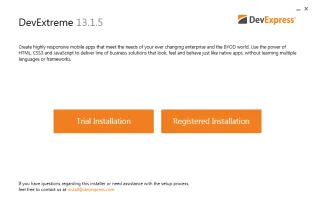
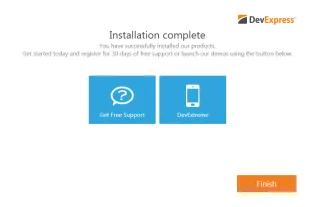
After installation is complete you are presented with a dialog that serves as a hub to developers getting started with DevExtreme. Resources available to you include links a number of online demos, demo source code that was installed with DevExtreme and comprehensive documentation.

The online chart demos in the DevExtreme Data Visualization Gallery are particularly impressive. There are over 50 charts and their source code available which I found a great aid when using DevExtreme.
Getting Started

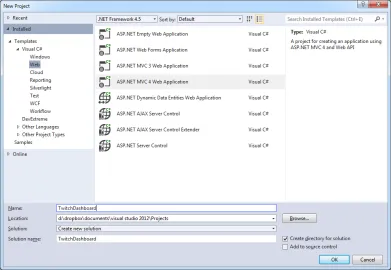
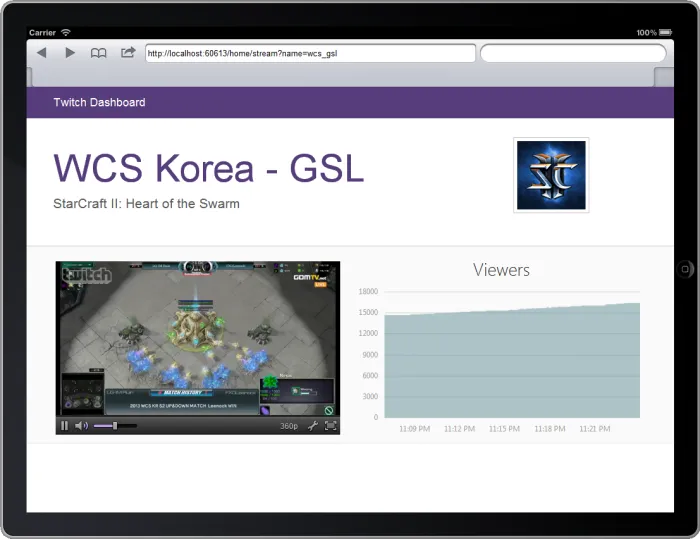
To try out DevExtreme’s charting widgets I’m going to create a simple cross-platform dashboard for the online game streaming website Twitch. My dashboard app will query Twitch’s REST API for data and graph the games being streamed and the number of viewers over time of the most popular streams.

Although I’m building my dashboard using ASP.NET MVC and Visual Studio, DevExtreme is a JavaScript framework and it can be used with any server side language and IDE.
Reference the DevExtreme CDN

The first step is adding the DevExtreme charting JavaScript file to the website. Fortunately DevExpress provides a CDN that hosts the JavaScript file we need.

<script type="text/javascript" src="http://cdn3.devexpress.com/jslib/13.1.5/js/dx.chartjs.js"></script>

The CDN returns a compressed, cached response to keep the website nice and fast.

Creating a Chart

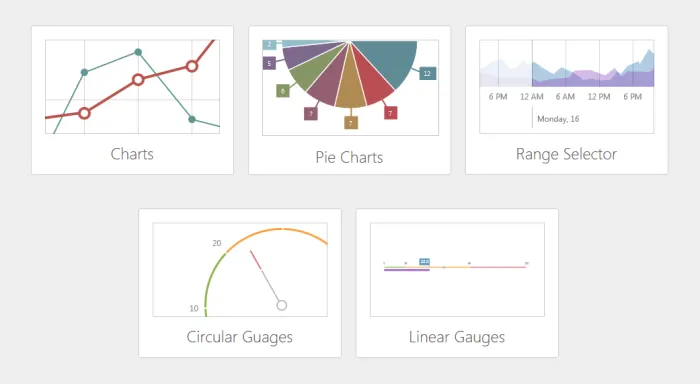
DevExtreme’s data visualization widgets include line, bar, area and pie charts; circular and linear gauges; and range selectors. On the dashboard homepage I will create a pie chart displaying the most popular games being streamed on Twitch.

$("#gamesChartContainer").dxPieChart({
    dataSource: [
        {
            game: "Test game 1",
            viewers: 50,
            channels: 1,
            image: "test-game-1.jpg"
        },
        {
            game: "Test game 1",
            viewers: 50,
            channels: 1,
            image: "test-game-1.jpg"
        }
    ],
    series: [
        {
            argumentField: "game",
            valueField: "viewers",
            label: {
                visible: true,
                connector: {
                    visible: true,
                    width: 1
                }
            }
        }
    ]
});

Call dxPieChart on the element you want the chart to appear in. Options are passed to the chart using a simple JSON object as an argument.

Fetching Data from Twitch.tv

Right now the pie chart is displaying static data. To bring in some real world data we’ll call Twitch.tv’s REST API. Because their API supports JSONP we can call the services directly from JavaScript using jQuery.

var ds = [];
$.getJSON("https://api.twitch.tv/kraken/games/top?callback=?", function (json) {

    for (var i = 0; i < json.top.length; i++) {
        ds.push({
            game: json.top[i].game.name,
            viewers: json.top[i].viewers,
            channels: json.top[i].channels,
            image: json.top[i].game.box.large
        });
    }
});

Once you have your data ready just include it in the options when initializing the chart.
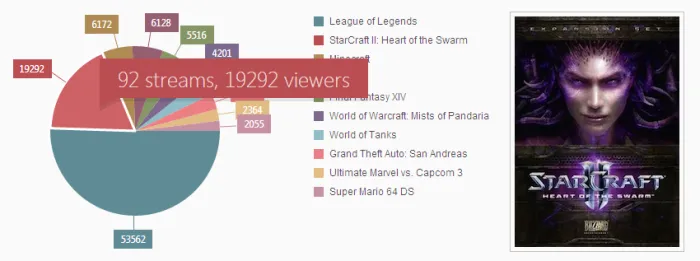
Interactive Chart

The DevExtreme chart widgets have extensive options for hooking into client side events. To add a tooltip and click action to each game in the pie chart just wire up some functions to the tooltip and pointClick properties when initializing the chart.

tooltip: {
    enabled: true,
    customizeText: function () {
        var game = ds[this.point.index];
        return game.channels + ' streams, ' + game.viewers + ' viewers';
    }
},
pointClick: function (p) {
    var game = ds[p.index];
    $("#gameContainer").html("<img class='game-image' src='" + game.image + "'/>");
},

Creating a Dynamically Updating Chart

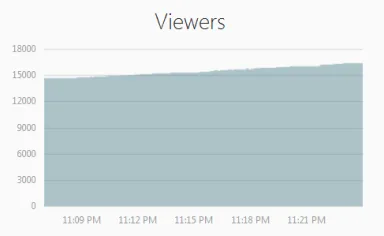
The second chart we’ll create for the dashboard application is an area graph over viewers over time for a video game stream. The chart will start out without any data but every couple of seconds we’ll call a Twitch API to return the viewer count and dynamically update the graph with the new data.

$("#streamChartContainer").dxChart({
    title: "Viewers",
    commonSeriesSettings: {
        type: "splineArea",
        argumentField: "date"
    },
    series: [
        { valueField: "viewers", name: "Viewers" }
    ],
    argumentAxis: { valueMarginsEnabled: false },
    legend: { visible: false },
    animation: { enabled: false }
});

Note that no data source has be included in the code above. Data will be retrieved from the Twitch API and set against the chart dynamically.

var dataSource = [];

function getStreamData() {
    $.getJSON("https://api.twitch.tv/kraken/streams/" + name + "?callback=?", function (json) {

        var viewers = json.stream.viewers;

        dataSource.push({
            date: new Date(),
            viewers: viewers
        });

        $('#streamChartContainer').dxChart('option', 'dataSource', dataSource);
    });
}

setInterval(function () {
    getStreamData();
}, 5000);

Every 5 seconds the browser will poll the server for the current viewers, add the count and date to the data collection and then update the chart with the data collection as an argument.
Wrapping Up

I found the chart widgets in DevExtreme to be fast to setup and easy to use while still offering a lot of power for customization.

My small application has barely scratched the surface here of what the chart widgets offer, let alone the other features included in DevExtreme. If you’re looking to building a cross-platform multi-device application then DevExtreme is definitely worth a look.

Click here to download the Twitch Dashboard application source code
Disclosure of Material Connection: I received one or more of the products or services mentioned above for free in the hope that I would mention it on my blog. Regardless, I only recommend products or services I use personally and believe my readers will enjoy. I am disclosing this in accordance with the Federal Trade Commission’s 16 CFR, Part 255: Guides Concerning the Use of Endorsements and Testimonials in Advertising.

DefaultSettings

If you have used Json.NET then you will be familiar with JsonSerializerSettings. This class has been an extremely successful at providing an simple way for developers to customize Json.NET.

With Json.NET’s increasing popularity and its use by more third party frameworks, a problem I have noticed is a developer has to customize serializer settings in multiple places. If you want your HtmlHelper.ToJson extension method, Web API services and SignalR to serialize JSON the same way across an application then you have to manually share a JsonSerializerSettings instance between them and figure out how each different framework allows you to customize Json.NET.

The solution I have come up with is to add global default settings. Set once with JsonConvert.DefaultSettings in an application, the default settings will automatically be used by all calls to JsonConvert.SerializeObject/DeserializeObject, and JToken.ToObject/FromObject. Any user supplied settings to these calls will override the default settings.

// settings will automatically be used by JsonConvert.SerializeObject/DeserializeObject
JsonConvert.DefaultSettings = () => new JsonSerializerSettings
  {
    Formatting = Formatting.Indented,
    ContractResolver = new CamelCasePropertyNamesContractResolver()
  };

Employee e = new Employee
  {
    FirstName = "Eric",
    LastName = "Example",
    BirthDate = new DateTime(1980, 4, 20, 0, 0, 0, DateTimeKind.Utc),
    Department = "IT",
    JobTitle = "Web Dude"
  };

string json = JsonConvert.SerializeObject(e);
// {
//   "firstName": "Eric",
//   "lastName": "Example",
//   "birthDate": "1980-04-20T00:00:00Z",
//   "department": "IT",
//   "jobTitle": "Web Dude"
// }

Because there are cases where JSON should not be customized, e.g. a Facebook or Twitter library, by default JsonSerializer won’t use DefaultSettings, providing an opt-out for those frameworks or for places in your application that shouldn’t use default settings. To create a JsonSerializer that does use them there is a new JsonSerializer.CreateDefault() method.

In the short term there will be some third party libraries that don’t use default settings that should, and some third party libraries that do use default settings that shouldn’t. If you encounter a situation where DefaultSettings doesn’t work for you then continue to customize Json.NET settings like you do today.

In the long term DefaultSettings will hopefully provide a simple, standard way to developers to customize JSON in .NET applications.

Extension Data

The second new feature in Json.NET 5.0 Release 5 is copied inspired by WCF’s IExtensibleDataObject.

Extension data is a JSON object’s values that aren’t matched to a .NET property during deserialization. By placing the JsonExtensionDataAttribute on a dictionary all unused values are automatically added to that dictionary and are accessible by you.

public class DirectoryAccount
{
  // normal deserialization
  public string DisplayName { get; set; }

  // these properties are set in OnDeserialized
  public string UserName { get; set; }
  public string Domain { get; set; }

  [JsonExtensionData]
  private IDictionary<string, JToken> _additionalData;

  [OnDeserialized]
  private void OnDeserialized(StreamingContext context)
  {
    // SAMAccountName is not deserialized to any property
    // and so it is added to the extension data dictionary
    string samAccountName = (string)_additionalData["SAMAccountName"];

    Domain = samAccountName.Split('\\')[0];
    UserName = samAccountName.Split('\\')[1];
  }
}

Changes

Here is a complete list of what has changed since Json.NET 5.0 Release 4.

  • New feature - Added global default serialization settings with JsonConvert.DefaultSettings
  • New feature - Added extension data support with JsonExtensionDataAttribute
  • New feature - Added NullValueHandling and DefaultValueHandling support to serializing dynamic types
  • Change - Changed some explicit interface methods on JArray to public to support use with ImpromtuInterface
  • Fix - Fixed deserializing non-ISO formatted date dictionary keys
  • Fix - Fixed values not being set when deserializing with DefaultValueHandling.IgnoreAndPopulate
  • Fix - Fixed deserializing with type named handling and assemblies loaded with Assembly.LoadFrom
  • Fix - Fixed deserializing Regexes when using StringEnumConverter
  • Fix - Fixed serializing and deserializing typed DataSets

Json.NET CodePlex Project

Json.NET 5.0 Release 5 Download - Json.NET source code and assemblies